A paperback sketchbook with device frames printed on the pages: mobile, tablet and desktop templates, plus space for project planning. Most product designers still sketch a flow on paper before they build it on screen, because paper is fast and nobody treats a pencil sketch as final. Pre-drawn frames keep those sketches at the right proportions, so a phone screen does not end up as wide as a laptop. It suits a UX designer, a UI designer or a developer who sits in design reviews. The paper is plain notebook stock, so markers may bleed through; pair it with fineliners or a pencil. It costs little and gets used in the next kickoff meeting.
Pros
- Device frames printed on every spread
- Gets used in the next kickoff
- Low cost for a Secret Santa
Cons
- Notebook paper, heavy markers may bleed
Best for: UX and UI designers who sketch flows first
A 6-inch digital caliper in solid stainless steel with a large LCD, inch and millimeter modes, a thumb roller, a locking screw and a shockproof case. The listing gives 0.001-inch accuracy and mentions checking 3D print filament and woodworking joints. The Bureau of Labor Statistics notes that industrial designers build physical prototypes and use 3D printers, and a caliper is how you check whether a printed part matches the CAD file. It suits a product designer, an industrial designer or anyone who models objects for a living. A UX designer who never leaves the screen will have little use for it, so pick it for the person who keeps a shelf of prototypes.
Pros
- Daily tool for prototype work
- Inch and millimeter modes
- Comes with a protective case
Cons
- No use for a screen-only designer
Best for: industrial and product designers who build prototypes
Eight low-odor EXPO markers with ultra fine tips in assorted colors, sold for whiteboards, glass and other non-porous surfaces. Design teams spend a lot of time at the board: user flows, sitemaps, crazy-eights sketches and sprint plans. The standard chisel markers in most meeting rooms write too thick for a screen sketch, and half of them are dry. A designer with a personal pack of fine tips can draw small, label clearly and color-code a flow. It is a modest gift, so pair it with the glass whiteboard or a box of sticky notes if you want something to unwrap. Low odor matters in a small meeting room.
Pros
- Fine enough for screen sketches
- Eight colors for coding flows
- Low odor
Cons
- Modest on its own as a gift
Best for: whiteboard flows and sprint sessions
A small analog alarm clock from Braun, model BC03B, with a black case, luminous tipped hands, the yellow second hand the listing calls iconic, a crescendo beep alarm and a quiet sweeping quartz movement. Product designers study objects like this one for the plain face, the clear numerals and the single spot of color. It works as a desk clock or a bedside alarm, and it does not tick. The gift says you know what they care about without saying it on a mug. It is a small clock, so the face is not readable from across a room. Check the model if they already own one, since Braun makes several close variants.
Pros
- A well-designed object designers enjoy
- Quiet sweep, no ticking
- Gift-ready brand box
Cons
- Small face
- They may already own a Braun
Best for: a designer who loves good product design
The revised and expanded edition of The Design of Everyday Things, published by Basic Books. Don Norman's book walks through doors, light switches, stoves and later digital products to show why people blame themselves when the design is at fault. It gives designers shared words, such as affordances and feedback, that come up in critiques and product meetings. For a new designer or a career-changer from another field, it is a common first book. A senior designer may already own a worn copy, so ask, or give it with a note about why it still matters to you. The paperback is light enough for a commute.
Pros
- A classic that design teams reference
- Readable for non-designers too
- Low cost
Cons
- Senior designers may own it
Best for: UX, product and industrial designers at any stage
Less But Better is Dieter Rams's own book, published by gestalten, on his work and the thinking behind it. Rams led product design at Braun for decades, and his ideas about restraint still come up in product and interface design reviews. Industrial designers keep the book for the photographs of radios, shavers and shelving as much as for the text, and UX designers quote it when a feature list grows too long. It is a hardcover that looks good on a studio shelf. Some designers already own it, since it is a common gift in the field, so check first or include a gift receipt.
Pros
- A design classic from the source
- Strong photographs for a studio shelf
- Fits industrial and UX designers alike
Cons
- Common gift, they may own it
Best for: industrial and product designers
A spiral sketchbook with a hard wood cover that the seller laser-engraves with one line of text, usually a name. It measures 12 by 8.5 inches, holds 60 sheets of 120 gsm paper and can be bound on the side or the top. Designers burn through cheap sketchbooks, so a book with their name on the cover feels like a step up and stays on the desk. The heavier paper takes fineliners and light marker better than notebook stock. Order a week or more ahead, since the seller makes each one to order, and double-check the spelling. Sixty sheets go fast for a heavy sketcher, so it works best as a book for finished concepts.
Pros
- Name engraved on a wood cover
- 120 gsm paper for ink
- Lies flat
Cons
- Only 60 sheets
- Needs extra days to make
Best for: a designer who sketches every day
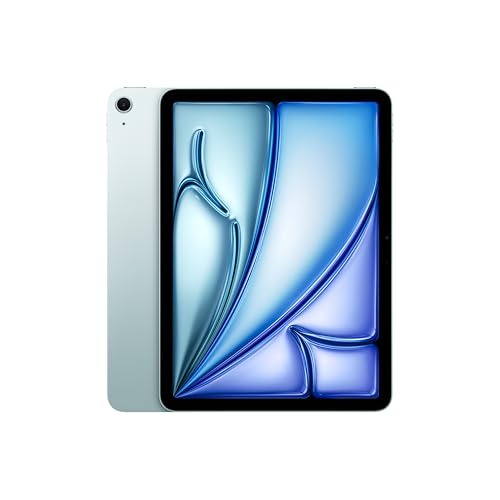
The 11-inch iPad Air with Apple's M4 chip, a Liquid Retina display, 128GB of storage, Touch ID, Wi-Fi 7 and all-day battery life. Designers use a tablet to check how a layout feels in the hand, to run a prototype in front of a user, and to sketch with a stylus away from the desk. It is a family gift or a team gift for a milestone, since the price sits far above a coworker budget. The listing is for the tablet alone, so plan on a stylus and a case if the designer wants to draw. A designer who already owns a recent iPad will get more from the headphones or the mouse in this section.
Pros
- Real device for testing designs
- Fast M4 chip
- Portable for sketching
Cons
- Stylus and case cost extra
- Far above a coworker budget
Best for: a designer who sketches and reviews prototypes away from the desk
The Bluetooth edition of Logitech's MX Master 3S, with an 8K DPI sensor that tracks on glass, MagSpeed scrolling, quiet clicks and programmable buttons. Designers spend hours dragging, zooming and nudging layers, and a mouse with a fast scroll wheel and a thumb wheel for side-scrolling helps on wide canvases and long pages. The extra buttons can carry shortcuts for the tools they use most. This edition has no USB receiver and no charging cable in the box, according to the listing, so check that their computer has Bluetooth and that a USB-C cable is around. It suits a team gift or a family gift; a single coworker would usually spend less.
Pros
- Fast scroll for long canvases
- Programmable buttons for shortcuts
- Quiet clicks in a shared studio
Cons
- No receiver or cable in the box
- Right-handed shape only
Best for: a designer who lives in design software
A light bar that clamps to the top edge of a monitor and lights the desk below without bouncing glare off the screen. The listing gives auto-dimming, adjustable brightness and color temperature, a CRI above 95 and a counterweight clamp for monitors 0.4 to 1.2 inches thick. For a designer, glare on the screen makes color and contrast harder to judge, and a lamp on the desk takes room from the sketchbook. A high CRI light also shows paper samples and printed proofs closer to their real color. It is a team gift or a family gift. Check the back of the monitor first, since some designs do not fit the clamp.
Pros
- No glare on the screen
- High CRI for checking color
- Frees desk space
Cons
- Clamp may not fit every monitor
Best for: a designer who works late at the monitor