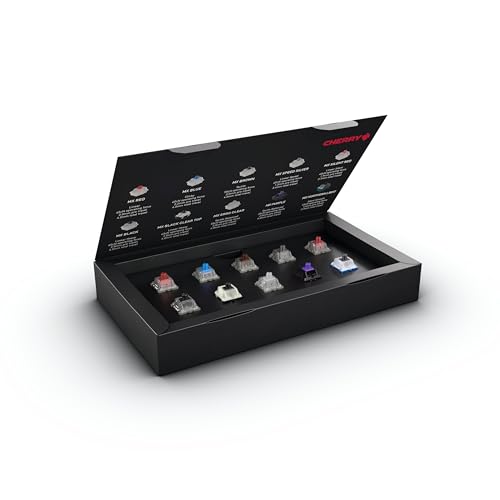
A small cardboard box of 10 Cherry MX switches, held in place so the pins do not bend in shipping. The listing names them: MX2A Black, Blue, Brown, Red, Silent Red, Speed Silver and Ergo Clear, plus MX Purple, Northern Light and Black Clear Top, covering linear, tactile and clicky types. A programmer types for most of the working day, and the switch decides how every keystroke feels. Pressing ten of them side by side settles the question before they spend real money on a keyboard. It suits someone who already talks about keyboards or one who just bought a hot-swap board. For a developer who types on a laptop and does not care, it is a curiosity.
Pros
- Ten real switches to compare by feel
- Fits a Secret Santa budget
- Sparks a long keyboard conversation
Cons
- Little use to someone happy with a laptop keyboard
- Switches only, no keyboard
Best for: developers curious about mechanical keyboards
A two-piece set of memory foam wrist rests with a diamond-pattern cover: a 17.3-inch rest for the keyboard and a 5.9-inch rest for the mouse, both 0.83 inches tall. The listing describes a silicone base that keeps them from sliding and foam meant to ease the pressure of a hard desk edge on the wrists and forearms. A coder types and mouses for most of the day, and the desk edge is where the discomfort starts. This set fixes that for the price of a lunch. The height suits a low-profile or standard keyboard, but a tall mechanical keyboard may need a thicker rest. It is not glamorous, which is why few people buy one for themselves.
Pros
- Keyboard and mouse rests in one set
- Non-slip base stays put
- Fits a coworker budget
Cons
- May sit low for tall mechanical keyboards
- Not an exciting gift to unwrap
Best for: anyone who codes all day
A large cloth desk mat, 31.4 by 11.7 inches, printed with a reference of common Vim commands. It covers the area under the keyboard and the mouse, has stitched edges so it will not fray, and grips the desk with a rubber base. Vim has a reputation for being hard to leave and harder to master, and a printed cheat sheet under the hands is a light joke and a real aid. It suits a developer who lives in Vim or Neovim, or one who keeps promising to learn it. For someone devoted to VS Code, pick a Linux command mat or the stickers instead. The mat replaces a mouse pad, so check the desk is deep enough.
Pros
- Commands sit right under the hands
- Doubles as a full-size mouse pad
- Stitched edges hold up
Cons
- Only useful to Vim users
- Needs a deep desk
Best for: Vim users and developers learning it
A folding aluminum laptop stand for 10 to 17.3-inch laptops, adjustable for height and angle. The listing points to a larger, heavier base than earlier versions for stability, silicone pads that protect the laptop, and vent holes for airflow. In the 2025 Stack Overflow survey, most developers worked remote or hybrid, which often means a laptop on a kitchen table and a neck bent down all day. Raising the screen to eye level fixes the posture problem in a minute. Pair it with an external keyboard, since typing on a raised laptop is awkward. It folds flat, so a hybrid coder can carry it to the office on the days they go in.
Pros
- Raises the screen to eye level
- Folds flat for hybrid days
- Solid aluminum build
Cons
- Needs an external keyboard and mouse
- Takes desk space when open
Best for: hybrid developers who work from a laptop
A 15.7-inch LED bar that sits on top of a monitor on a counterweight clip, with no tools to install. The listing describes an asymmetric beam aimed at the desk and keyboard, not the screen, so it lights the workspace without adding glare. It offers three color temperatures from 3000K to 6500K and stepless dimming from a switch on the side. For a programmer who works into the evening or keeps a dim room to stay focused, it beats a desk lamp that takes space and throws light into the eyes. It is a lower-priced alternative to the well-known brand bars. It runs on USB, so the monitor or a hub needs a spare port.
Pros
- Lights the keyboard without screen glare
- No-tool clip install
- Fits a coworker budget
Cons
- Needs a free USB port
- Less polished than premium light bars
Best for: night owls and on-call engineers
A classic yellow rubber duck, 10.5 inches tall and made of vinyl. The listing sells it as a bath toy. On a developer's desk it becomes a tool: rubber duck debugging is the habit of explaining your code to a silent listener, step by step, until the bug becomes obvious. The name comes from an anecdote in The Pragmatic Programmer about a developer who carried a rubber duck for exactly that purpose. A standard bath duck works, but a jumbo one turns into a team mascot that sits on the shared desk and gets passed to whoever is stuck. It is a joke gift with a real use. It is also a large vinyl duck, so it takes desk space.
Pros
- A programming joke with a real method behind it
- Big enough to be a team mascot
- Every developer gets it
Cons
- Sold as a bath toy, not a desk item
- Takes up desk space
Best for: the team's designated debugging partner
An 11 oz ceramic mug, 3.75 inches tall, printed with "It Works On My Machine!" The line needs no explanation to anyone who has shipped code: a bug appears in testing or production, and the developer who wrote it cannot reproduce it at their desk. Every team has heard it, and most have said it. The listing says the mug is printed in the USA, safe on the top rack of the dishwasher and in the microwave, and comes with a choice of interior and handle colors. It is a classic Secret Santa gift for a developer. The downside: programming mugs are common, so a coder may already own one with a similar joke.
Pros
- The joke every developer knows
- Dishwasher and microwave safe
- Fits any Secret Santa limit
Cons
- Programmer mugs are a common gift
- Standard 11 oz size
Best for: the developer who says it most
The second edition of The Pragmatic Programmer, published for the book's 20th anniversary. It is the source of rubber duck debugging and a long list of habits developers now take for granted, written for programmers who want to get better at the craft, not at one language. A senior developer can hand it to a junior one with a note about which chapter helped them most, which makes it more personal than it looks. It is a book, so it only works for someone who reads. A senior engineer may own the first edition already, and the new one may feel familiar, though the anniversary edition is a nice upgrade for a shelf.
Pros
- A classic that suits any language
- Great from a senior to a junior developer
- Lasts a whole career
Cons
- Senior developers may own a copy
- Only for readers
Best for: junior developers and new grads
An Arduino-compatible starter kit from ELEGOO with an UNO R3 board and 22-plus guided lessons. The listing lists a pre-soldered LCD, a breadboard and power module, ultrasonic and temperature sensors, a joystick, an IR remote, and servo and stepper motors, with example code for the Arduino IDE. A web or backend developer can follow the lessons in a weekend and make LEDs blink, motors turn and sensors report back, all without soldering. It is the most direct route from code on a screen to something that moves on the desk. A developer who already builds hardware will find it basic. Everyone else gets a weekend project that feels nothing like work.
Pros
- No soldering needed
- 22-plus guided projects
- Code that moves something real
Cons
- Too basic for hardware hobbyists
- Lots of small parts to keep track of
Best for: web developers who want a hardware side project
A 75% wireless keyboard with magnetic Hall effect switches instead of standard mechanical contacts. The listing explains that each switch's actuation point adjusts from 0.2 to 3.8 mm in 0.1 mm steps through a web configurator that also handles key remapping and macros. It connects over 2.4 GHz, Bluetooth or USB-C, works with Mac and Windows with keycaps for both, and the pre-lubed Gateron switches are hot-swappable. For a developer who already cares about keyboards, it is a real upgrade. For one who does not, it is a large, expensive surprise. Keyboard taste is personal, so this works best when family or the team knows the person wants one.
Pros
- Adjustable actuation and remapping
- Wireless with three connection modes
- Hot-swappable switches
Cons
- Keyboard taste is personal
- Family or team price
Best for: a developer ready for a serious keyboard